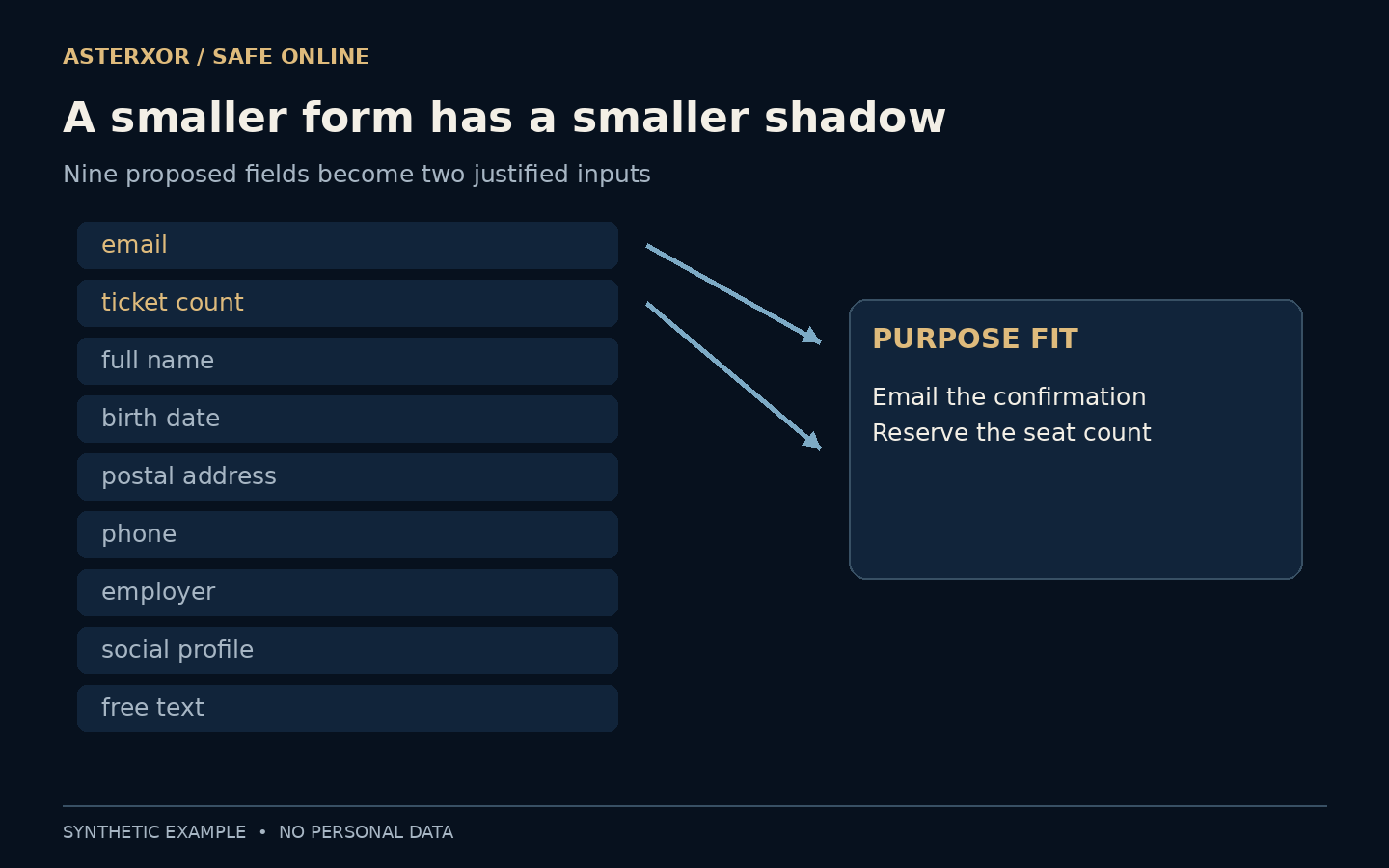
Every empty box makes a quiet request: tell us something else about yourself.
A registration form often grows one reasonable-sounding field at a time. A name might help later, a birthday might be interesting, and a free-text box seems flexible. Eventually the form contains a small biography when the task only requires reserving a seat. Data minimization starts earlier than storage security: it asks whether the information needs to enter the system at all.
The purpose should choose the fields. The fields should not invent the purpose.
Give the form one sentence of purpose
Our fictional workshop needs to reserve the requested number of seats and email an entry confirmation. Tickets are unnamed. There is no delivery, age check, catering or separate marketing campaign. These assumptions matter because a field can be necessary in one setting and unnecessary in another. A smaller form is not automatically a correct form.
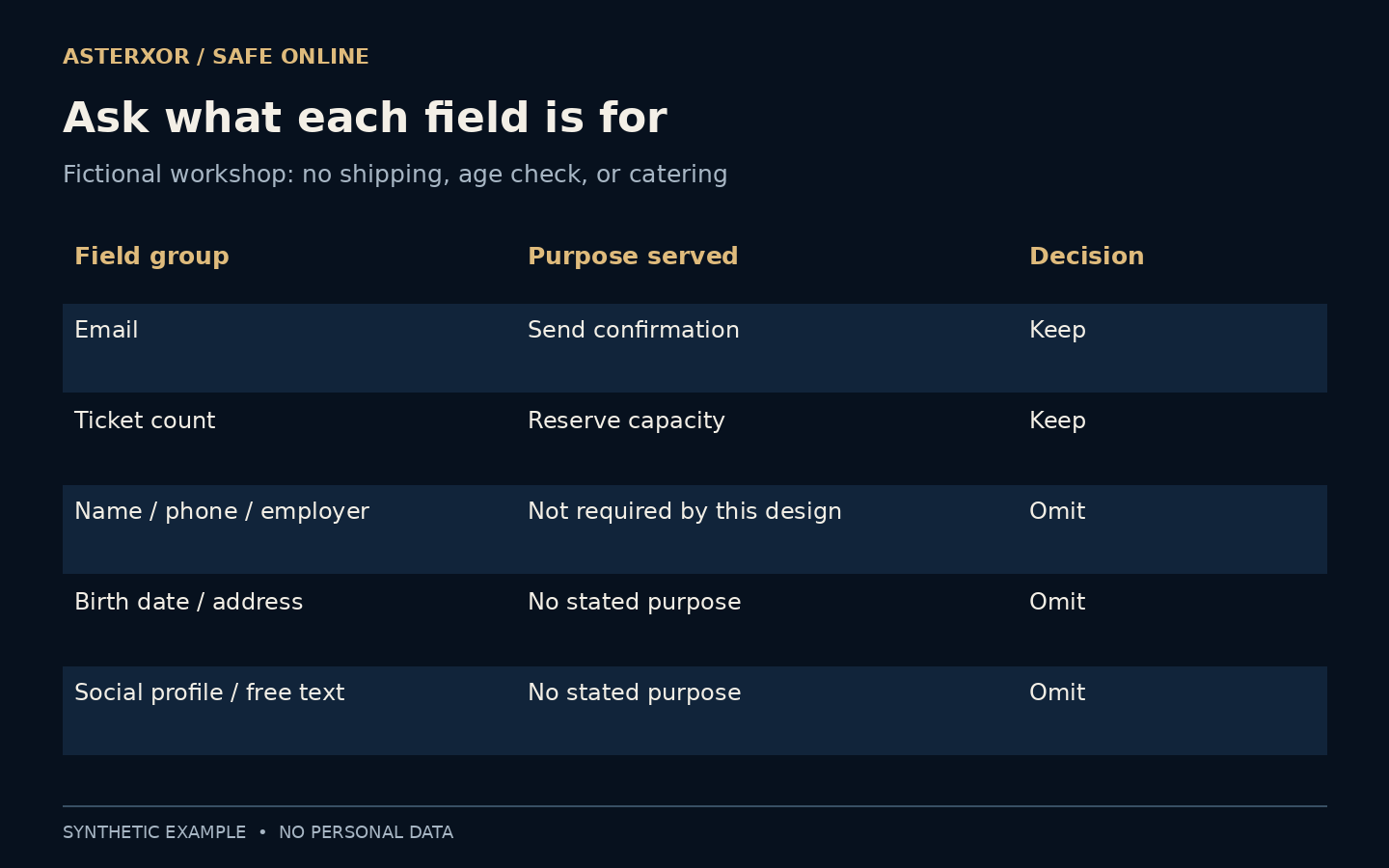
We wrote down the purpose before evaluating inputs. Email serves delivery of the confirmation; ticket count serves capacity planning. We did not need to know an attendee’s employer to perform either task. A clear purpose makes it possible to explain both inclusion and omission without appealing to vague hopes that extra data might be useful someday.
Purpose is most useful when it predicts a decision. If the organizer needs to know whether another seat can be booked, ticket count answers that question. Employer does not. Writing this relationship beside each field creates a reviewable reason instead of a preference for short forms. If the service cannot explain what it would do differently with an answer, the collection deserves another look.
Nine proposals, two justified inputs
The candidate form contained email, ticket count, full name, birth date, postal address, phone, employer, social profile and a free-text box. Under the stated design, we kept the first two and omitted seven. We classified field names, not people, and never filled the form with real or invented participant identities.
The necessity table is the argument behind the decision. A postal address has no job when nothing is shipped. A birth date has no job without a justified age-related need. If the workshop later adds a legitimate requirement, the design needs another review rather than silently collecting everything in anticipation.
Eight hundred and forty values never arrive
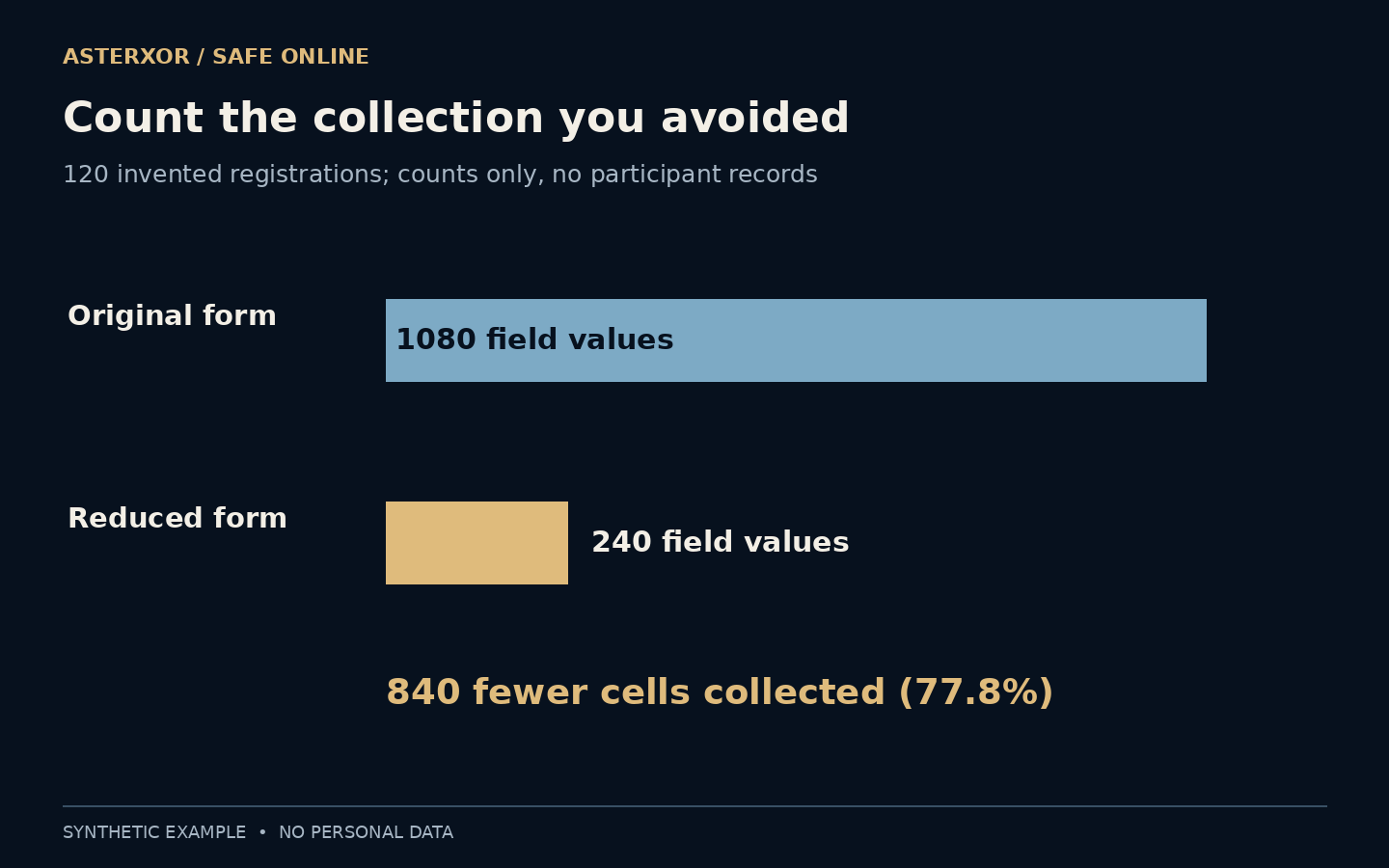
For 120 fictional registrations, nine completed fields would create 1,080 field values. Two fields create 240. The difference is 840 values, or 77.8 percent fewer cells. This is a straightforward multiplication exercise, not a measurement of real visitors, storage savings or the chance of a security incident.
Nor does a cell count rank sensitivity. One health detail can matter more than many ordinary preferences, and two fields can still identify someone. The calculation makes the collection surface visible; it does not turn privacy into a single score. The useful conclusion is that seven entire categories of unnecessary responses never have to be handled.
Optional information is still information
Making a field optional reduces pressure, but submitted answers still enter the organization’s care. A broad free-text box can collect details the organizer never needed or intended to request. If a particular accessibility need must be discussed, provide a clear, limited route for that purpose instead of inviting a general personal history on every registration.
Likewise, replacing a full birth date with an age band only helps when age information has a real role. If it does not, the smaller version remains unnecessary. Good minimization considers precision, audience and context as well as quantity. It is possible to ask too little for a task, so preserve what the purpose genuinely requires.
Be careful with a vague “anything else?” box. Someone may put a health condition or another person’s information there because they are trying to be helpful. A precise prompt can prevent accidental over-sharing better than a long warning after submission. Where a separate support conversation is genuinely needed, explain its audience and purpose before inviting the details.
The door checker does not need the whole registration
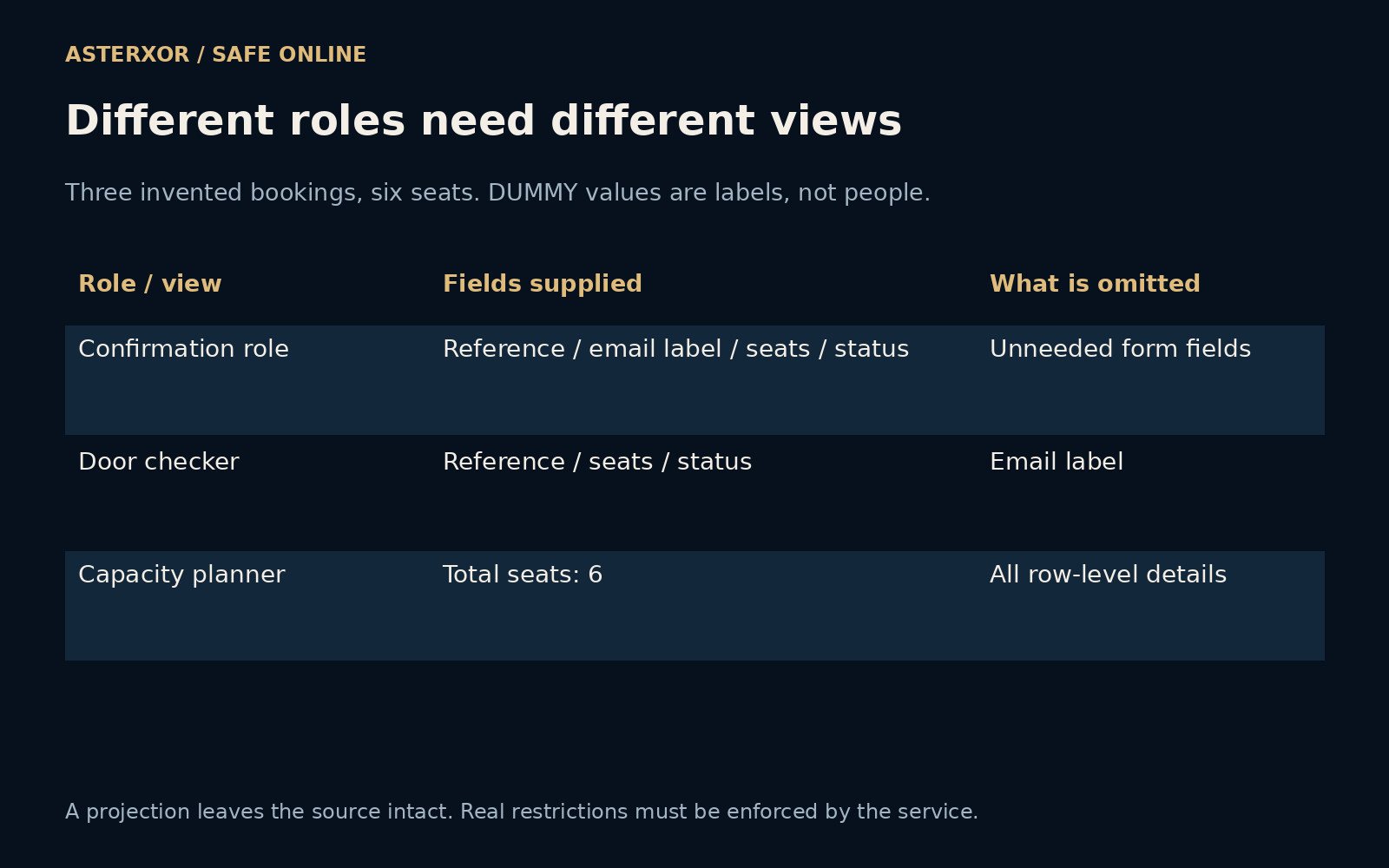
A separate workflow sketch uses three invented booking records, with seat counts of two, one and three. Email values are visibly dummy labels, not addresses or participant identities. Reference and confirmation status are internal operational fields in this sketch. They are not additional questions on the earlier form, so they do not change the 120-registration calculation or its two submitted inputs.
The confirmation role sees reference, email label, seats and status. A door-checking view receives only reference, seats and status. A capacity-planning view receives a single total: six seats. Six new checks confirm that the total survives these projections, the door view omits email, and the original placeholder records remain intact. Choosing fewer columns did not delete the source.
A reference can still link a row back to a person elsewhere, so this is not anonymization. Nor does drawing three views enforce real permissions: the application must actually restrict what each role can retrieve. The exercise offers a concrete review question for a proposed export: does this recipient need each column, or merely one decision that the columns can answer?
A lean intake needs a lean workflow
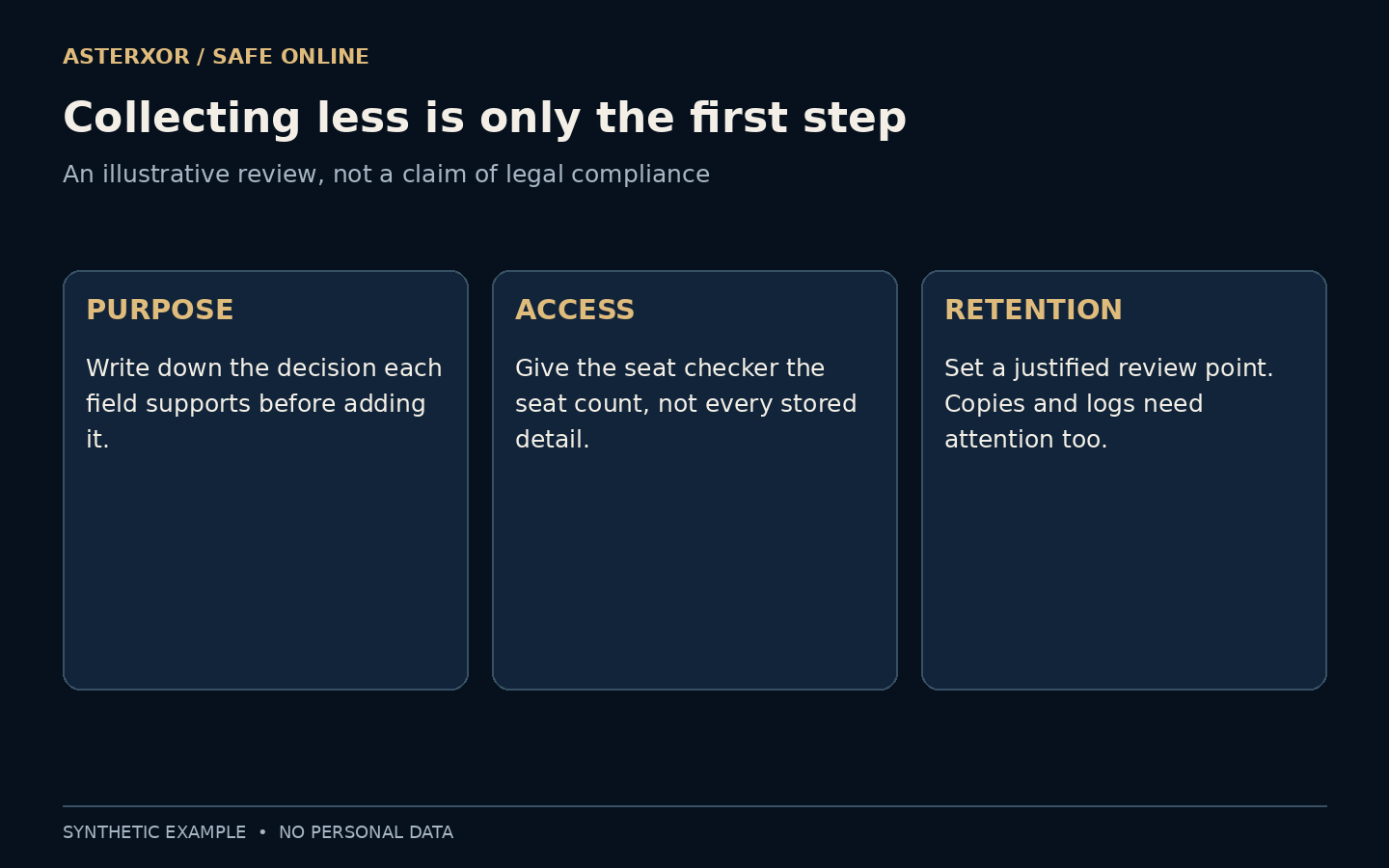
Information can multiply after collection through exports, support messages, analytics and backups. The seat checker might need the number of seats and a confirmation reference rather than the entire registration record. Decide what each role needs and avoid turning every operational task into another complete copy of the form.
Retention deserves a separate decision. Establish an appropriate review point and account for copies and logs, while respecting any applicable recordkeeping duties. Our arithmetic does not determine a lawful retention period or prove regulatory compliance. The ICO’s principle and the FTC’s practical guidance provide context, but the actual obligations depend on the activity and jurisdiction.
A practical review follows one record through the workflow rather than stopping at the form. Where does it appear in confirmation email, staff exports, support tools and diagnostic logs? Which copies are still useful after the event? A narrow input can become a wide distribution if each later tool receives the entire record by default. Our small field-count calculation makes no claim about those real systems.
You can ask what the box is for
As the person filling a form, pause when the requested detail seems disconnected from the task. Read the explanation, look for optional fields and ask the organization why a particular item is needed. Avoid supplying sensitive context in a general comment box merely because space is available. A blank optional field is often a perfectly complete answer.
As the form designer, make those choices easy to understand. Use specific labels, explain relevant purposes and resist adding a field simply because the template includes it. The best review question is concrete: what decision or service would fail without this answer? If nobody can explain that failure, reconsider the request before collecting the data.
If a service asks for an unnecessary field, do not automatically supply a fabricated answer that could later affect recovery, eligibility or contact. Ask whether it can be omitted, whether a less precise answer is supported, or whether another route exists. Data minimization is a design and disclosure question; inaccurate records can create a different problem without solving the original one.
Further reading
ICO: data minimisation principle ↗FTC: protecting personal information ↗Original documentation and useful background.