What useful thing would stop working if you declined this request?
Permission prompts often arrive when you are trying to finish something else. The quick response is to approve and move on. A better question is smaller than a full privacy investigation: which feature needs this access, and how much access does that feature actually require? A fictional matrix makes the connection between purpose and capability easier to see.
Let the feature explain the permission.
A capability is not evidence of misuse
A microphone permission enables certain forms of access; it does not prove that an app recorded anything. Likewise, the absence of one permission does not establish that an app collects no data. Network activity, account information and platform rules may create other paths. Permission review is one part of understanding an app, not a complete privacy verdict.
Different operating systems divide permissions differently, and some functions have technical requirements that are not obvious from a label. A request should therefore prompt a purpose check rather than an automatic accusation. Look for the developer’s explanation and the platform’s documentation, particularly when a familiar function is implemented differently on another device or version.
Three fictional features keep the exercise concrete
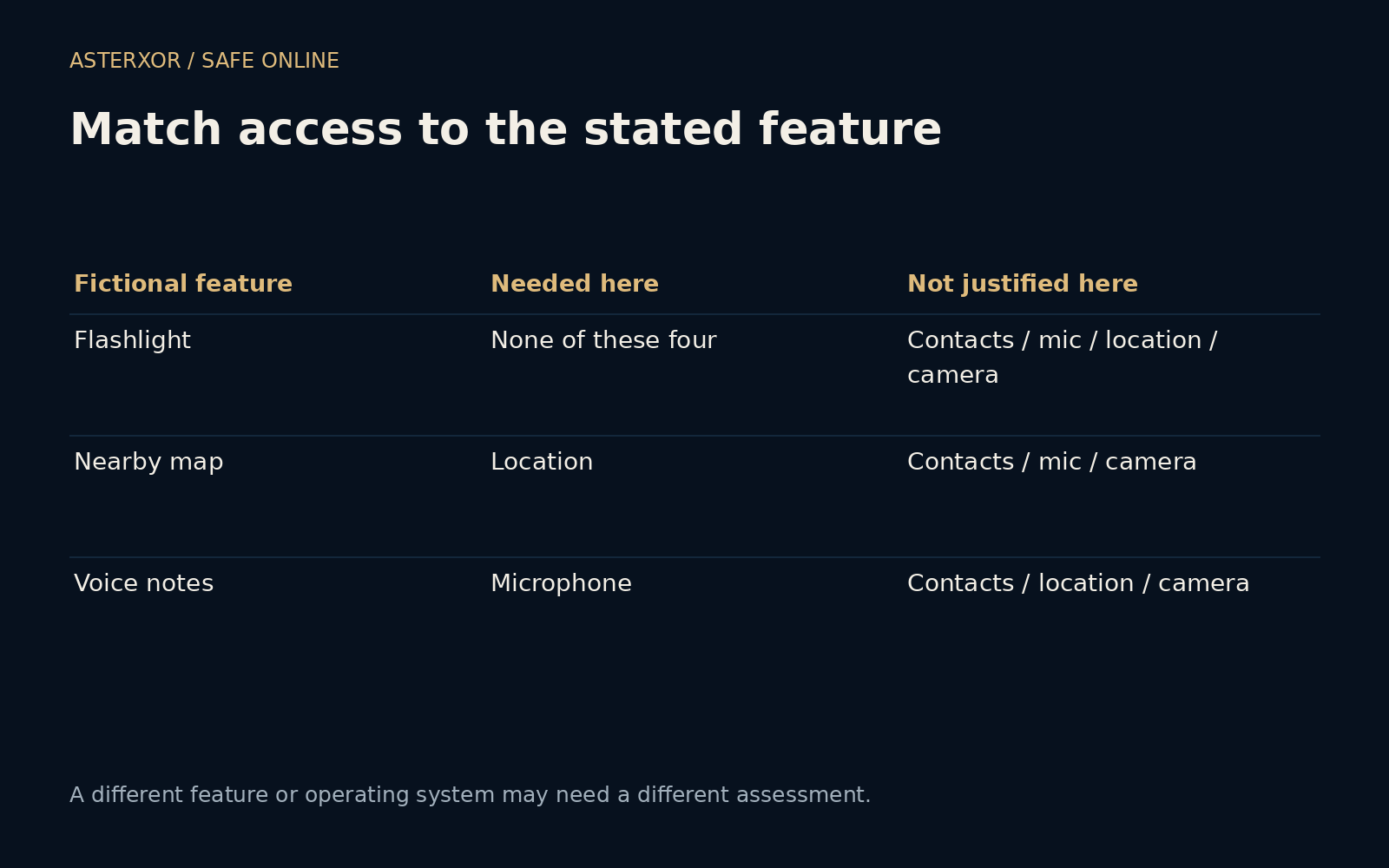
We define a simple flashlight, a nearby-place map and a voice-note recorder. Against each, we consider camera, microphone, contacts and location. In this declared scenario, the map needs location and the recorder needs the microphone. The flashlight needs none of these four. Two of twelve cells are marked necessary for the stated features.
That count is not a measurement of three real apps. A navigation feature could work with a manually entered place, and a camera-based tool would have a different purpose from our simple light. The point of the matrix is to make the purpose explicit before deciding whether access is justified. Changing the feature can legitimately change the assessment.
The amount of access matters after the purpose is clear
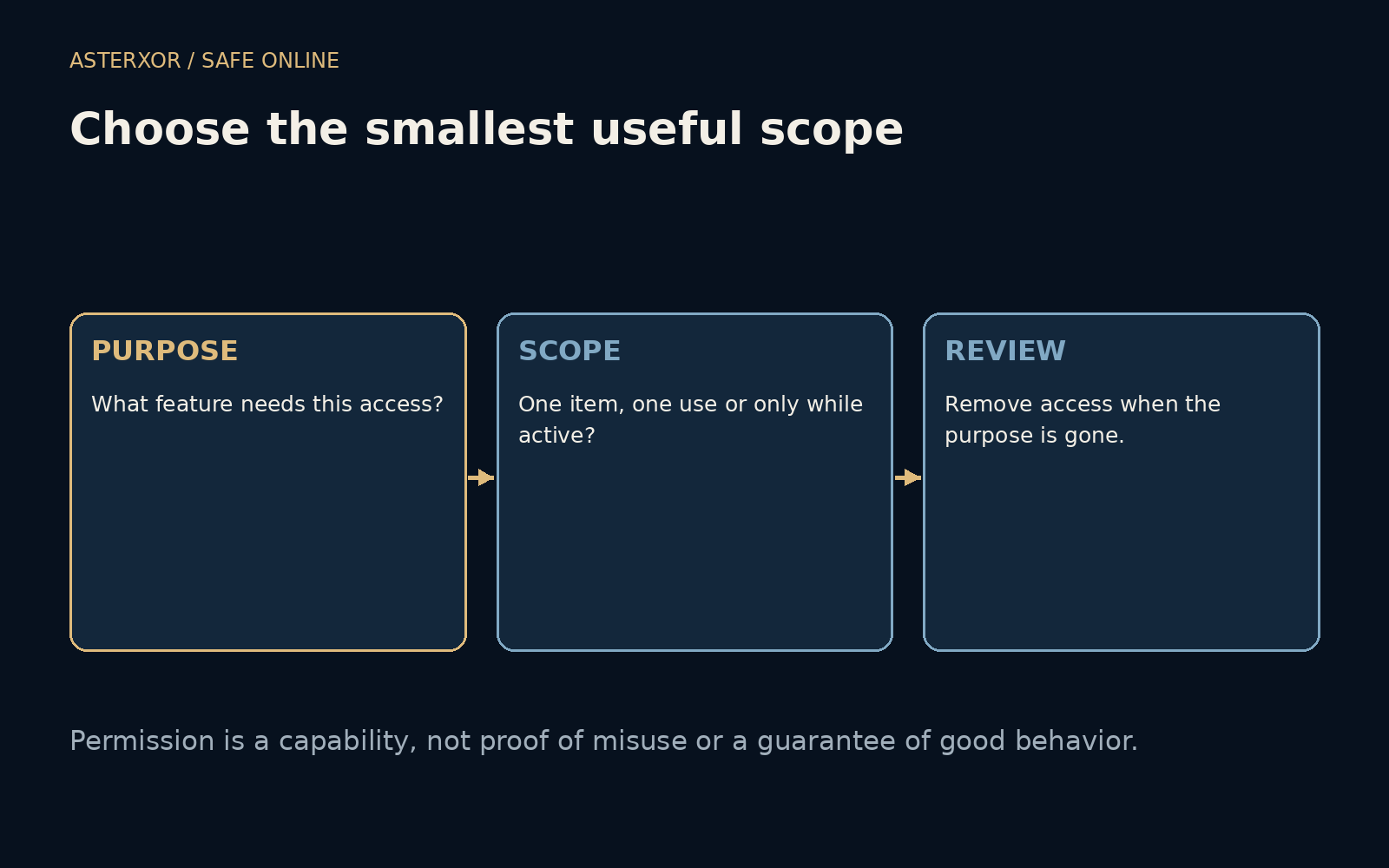
A legitimate reason to select a photo may not require access to an entire photo collection. A nearby recommendation may not require continuous background location. Platforms can offer selected-item access, approximate location, one-time permission or access only while using an app. Availability and wording vary, so read the choices shown on your own device rather than assuming every option exists.
Choose the smallest supported scope that still makes the intended feature useful. If denying a request disables the feature, the app should ideally explain that relationship. You can decide whether the benefit is worth granting access or whether another tool fits better. Convenience is a real benefit; the decision becomes clearer when it is traded against a concrete capability.
Permissions can outlive the reason you granted them
A travel app may retain location access after the trip, or an old recorder may keep microphone permission long after you stopped using it. Review permissions periodically and after an app changes its role. Removing unused access or uninstalling an unneeded app reduces capabilities that no longer serve a current purpose. It does not recall information already transmitted.
If an app suddenly requests a broader scope, ask what changed in the feature you use. A new function may explain the request, but you need not enable it merely because it exists. Check the source of the app and relevant update notes. Keep important software updated rather than freezing an old version solely to avoid examining a new prompt.
Make review practical rather than exhausting
Start with a few capabilities that matter to you: location, microphone, camera or contacts. Open the system’s permission settings and inspect which apps have them, following your device’s instructions. Our exercise did not inspect a real device, so it cannot tell you which installed app to remove or which menu path your operating system uses.
For shared or managed devices, respect the organization’s policies and the needs of other users. Do not disable a necessary accessibility or safety function without understanding its role. A permission budget is not a competition to reach zero. It is a way to keep each grant attached to a useful, understood purpose instead of letting access accumulate unnoticed.
Further reading
Android: App permissions best practices ↗Apple: Control access to information in apps ↗Original documentation and useful background.